n8n (pronounced "n-eight-n") is changing that conversation by giving you the flexibility to automate your work your way — whether you're a developer who codes in their sleep or someone who just wants their apps to talk to each other without calling IT.
Here's what makes it different: most automation tools force you to pick a lane. You're either stuck with a visual builder that can't handle complex stuff, or you're writing code from scratch. n8n says why choose? and lets you do both.
What You're Working With
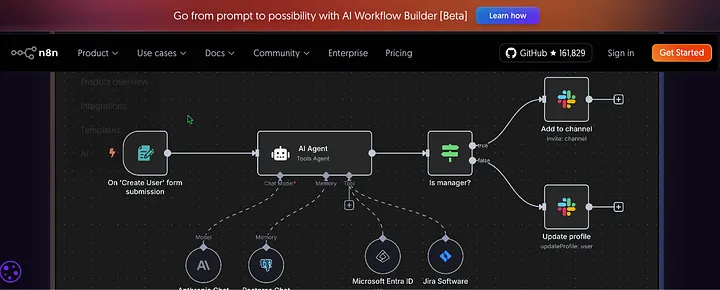
n8n is an open-source workflow automation platform built on a node-based interface. Think digital Lego blocks for your business processes. Each "node" represents one action — sending an email, updating a spreadsheet, analyzing data with AI, whatever you need.
You connect these nodes visually by dragging and dropping them onto a canvas. Click, connect, done. But here's where it gets interesting: when you need more control, you can drop JavaScript or Python right into your workflow. You can even paste cURL requests directly in there.
The platform works on triggers and actions. A form gets submitted (trigger), so send that data to Slack and save it to Google Sheets (actions). One company cut a two-week onboarding process down to two hours using workflows like this.
And unlike a lot of tools, you can merge workflow branches, not just split them. That flexibility matters when you're building something complex.
What You Can Do With It
- HR stuff: Set up new employee onboarding that automatically creates accounts in Slack, Google Workspace, and your HR system when someone gets added to your hiring platform. No more manual account creation across five different tools.
- Customer support: Build workflows that route tickets based on urgency, send automatic updates, and escalate issues that sit too long. Delivery Hero saved 200 hours monthly automating their IT operations this way.
- E-commerce: Connect your store to inventory management, shipping notifications, and follow-up emails. One workflow handles what used to take three people.
- Content creation with AI: Customer feedback gets analyzed by an AI model automatically, with summarized insights sent to your product team. No manual data crunching.
- Marketing automation: Lead comes in, gets scored, added to the right email campaign, and tagged in your CRM — all without touching it.
Try This Today
Create a workflow that sends you a Slack notification whenever someone fills out your Google Form. Fifteen minutes, visual editor, one of their 7,000+ templates. That's it. You'll see how this works without committing to anything complex.
What Makes This Worth Your Time
- Progressive complexity: Start with drag-and-drop. Add code only when you need it. Perfect for teams where some people code and others definitely don't.
- Real debugging: Re-run individual steps without restarting your whole workflow. Logs show up right next to your code.
- Your data stays yours: Self-hosting option means complete control. Your workflows, your servers, your rules.
- Fast prototyping: One company built their first workflow in two hours — three times faster than coding it from scratch.
- Enterprise-ready: Handles 220 workflow executions per second on a single instance. SOC 2 audited with regular security testing.
The Real Talk
Self-hosting requires technical knowledge. If Docker sounds like a shipping company to you, you'll need either training or the hosted version. Setup isn't scary for technical folks — 15 minutes with Docker — but it's not point-and-click simple either.
The visual interface is intuitive, but understanding workflow logic takes practice. You're not automating complex processes on day one without some learning.
If you self-host, you need proper server resources, especially for high-volume workflows. The platform can handle it, but your $5/month shared hosting probably can't.
And while the community is growing, it's smaller than commercial alternatives. Niche problems might take longer to solve.
Best case scenario: your team has at least one technically comfortable person who can handle the setup and trickier workflows.
What It Costs
Free open-source version on GitHub if you can handle your own infrastructure. Cloud-hosted option at n8n.io with managed hosting (typically starts around $20/user/month for business plans). Enterprise features — advanced security, role-based access, audit logs — available in higher tiers.
Biggest barrier isn't money; it's technical expertise for self-hosting. No Docker or server skills? Either invest in learning or pay for hosting.
But here's the win: no feature lock. Everything's available in the free version. You scale as you need to, not because they're forcing your hand.
Privacy and Security
Self-hosting means your data never leaves your infrastructure. Period. SOC 2 audited, regular penetration testing, encrypted secret storage, comprehensive audit logs.
Unlike cloud automation tools, n8n self-hosted doesn't process your data through third-party servers. Healthcare, finance, government — if you have strict data requirements, this handles it. The hosted version works differently, so check their data processing agreements for your specific compliance needs.
Who This Helps Most
- Small to mid-sized tech companies with some technical resources but limited engineering time
- Marketing teams connecting CRMs and email platforms without constant developer help
- Operations teams automating cross-departmental processes
- Developers wanting flexibility beyond rigid no-code platforms
- Compliance-focused organizations needing data control
"Automation is for everyone" works best when you have an automation champion — someone who gets both the business needs and enough technical concepts to build and maintain workflows.
What You Thought vs. Reality
- Open-source doesn't mean less secure — n8n's security often exceeds commercial tools
- You don't need to be a developer — many business users successfully build workflows with just the visual editor and templates
- Self-hosting isn't impossibly complex for technical users
- It's not another Zapier clone — the ability to merge branches and handle complex logic makes it fundamentally more powerful
- Free doesn't mean limited — the open-source version includes all core functionality
Your Move
n8n bridges the gap between no-code simplicity and developer flexibility better than most tools out there. It won't magically make automation effortless if you've never thought about workflow logic before, but it significantly lowers the barrier compared to traditional coding.
The real power is progressive disclosure — you only deal with complexity when you need it. That makes automation accessible to more people than most alternatives.
If you're willing to invest some learning time, n8n can transform how your team works by eliminating repetitive tasks and connecting siloed systems. Practical automation, within reach of everyday business users — not just technical specialists.
Ready to build? I've put together a detailed 15-minute tutorial that walks you through building your first automation from scratch — no experience required. You'll build a workflow that captures Google Form responses and automatically sends them to Slack. Follow the step-by-step tutorial here.
Even if you're not ready to build yet, browsing the 7,000+ templates at n8n.io will show you what's possible. Start with something simple. Get it working. Then build another one.