ChatGPT Work and Claude Cowork are both modes that sit right next to the regular chat window, and both are built on the same pitch: stop describing the task, let the AI finish it. ChatGPT Work is OpenAI's mode for "longer, multi-step work and finished deliverables," bundled into ChatGPT's paid team plans. Claude Cowork is Anthropic's mode for agentic work that reads, writes, and organizes files across a folder you connect on your computer, included on Claude's paid plans.
Both hand you back a finished document instead of a chat reply. How they get there is different enough that picking one matters. This post was researched and written inside a Claude Cowork session connected directly to this site's blog folder, so some of what's below comes from using the tool, not just reading about it.
Here's a feature-by-feature breakdown: what each one does, what it costs, and where they pull ahead of each other. No verdict at the end. Pick based on where your work lives, not on which one has the better demo.
The quick answer
- ChatGPT Work is a separate tab inside ChatGPT built for research, documents, spreadsheets, presentations, and Scheduled Tasks. Underneath it sits workspace agents, OpenAI's Codex-powered automation layer that connects to outside apps and keeps running after you close the tab.
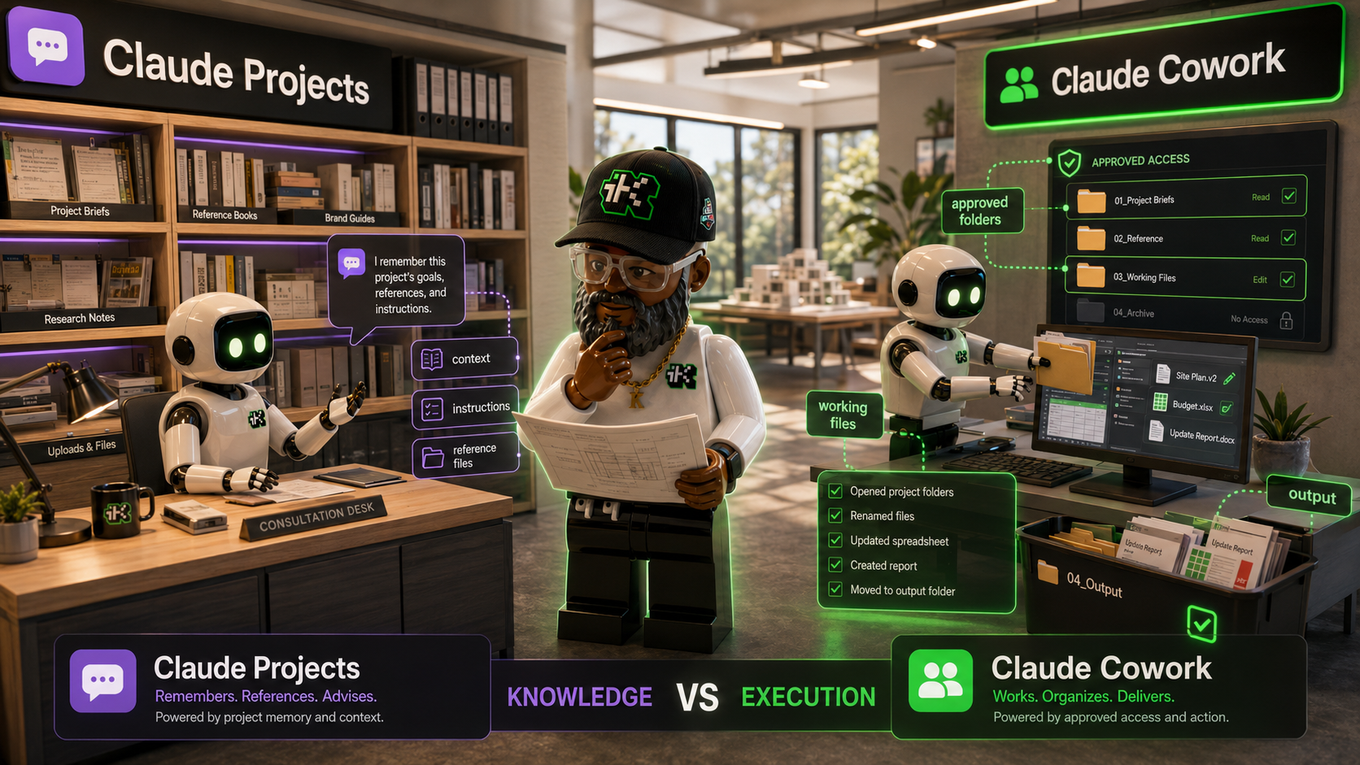
- Claude Cowork is a separate mode inside Claude that reads, writes, and edits files in folders you connect on your computer, works across sources you hand it, and runs recurring tasks on its own schedule too.
- The real split is where the work happens. ChatGPT Work is built around a cloud workspace and a named list of app connectors. Claude Cowork is built around your file system, with the Claude desktop app bridging a remote session to your local folders.
What "ChatGPT Work" is
"ChatGPT Work" is OpenAI's name for a mode inside ChatGPT, separate from Chat, bundled into ChatGPT's paid team plans rather than sold as its own subscription, and built for longer, multi-step jobs instead of quick back-and-forth questions. Open Work and you can research a topic, analyze information, or generate a document, spreadsheet, presentation, report, or Site, upload files for it to reference, and set up Scheduled Tasks that run once, repeat on a schedule, fire on a trigger, or watch a source for changes. Work keeps a separate history from Codex, OpenAI's dedicated coding agent, which stays focused on software work.
Workspace agents (the automation underneath Work)
Sitting under Work is a deeper layer OpenAI calls workspace agents, built on Codex. These connect to dozens of named business apps, run in the cloud so they keep going after you close the tab, and can prepare reports, write code, respond to messages, and route decisions on their own. They ask for your permission before doing anything sensitive, like sending an email or editing a shared spreadsheet, and they run inside Slack as well as ChatGPT. As of this writing, workspace agents are in research preview on Business, Enterprise, Edu, and Teachers plans, free through May 6, 2026, after which OpenAI switches to credit-based pricing.
ChatGPT agent (the version that predates Work)
ChatGPT agent came before Work and still runs on Pro, Plus, and Team plans. It browses the web with its own browser, runs code in a terminal, logs into sites when you hand it credentials, and controls a virtual computer through a multi-step job, including building an editable slideshow or spreadsheet. Pro gets 400 messages a month; Plus and Team get 40. It's not available in the EU or Switzerland yet, and the slideshow output is still rough around the edges.
ChatGPT Business and ChatGPT Enterprise (where Work lives)
Work needs one of the paid team plans. Business is the self-serve tier: a standard seat runs $25 a month billed monthly or $20 a month billed annually, with a 2-seat minimum, and bundles ChatGPT, Codex, GPTs, Projects, connected apps, Company Knowledge, and Deep Research. A Premium seat runs $125 a month (or $100 a year) and drops the 5-hour usage cap for 5 times the usage.
Enterprise is priced by quote, and the jump from Business buys governance more than smarter answers: role-based admin controls, SAML and OIDC single sign-on, an audit-log console, Enterprise Key Management for encrypted data handling, multi-region data residency (EU, UK, Japan, Australia), and a compliance API for pulling usage and access logs. Local file and desktop app access inside Work specifically needs Enterprise Key Management turned on for Enterprise and Edu workspaces.
What Claude Cowork is
Anthropic built Cowork to execute multi-step knowledge work, including research synthesis, document preparation, and file management, and hand back a finished result instead of an answer you act on yourself. Point it at a folder of drafts, downloads, or exported files, and it can rename and sort what's there, draft a document from your source material, summarize a set of sources into something ready for review, or pull specific data out of a dense file into a clean, structured format.
Cowork also has its own version of Projects: a saved workspace built around one folder, with its own instructions, scheduled tasks, and memory of past work in that folder. We covered how that compares to a regular Claude Project in a separate breakdown if you want the full picture.
Claude Pro, Team, and Enterprise (where Cowork lives)
Cowork is included on every paid Claude tier, not the free plan, per Claude's pricing page: Pro runs $17 a month billed annually or $20 a month billed monthly, with no seat minimum. Team has two seat types, a standard seat at $20 a month annually or $25 monthly, and a Premium seat at $100 a month annually or $125 monthly for 5 times the usage, with seat counts from 2 to 150 people. Enterprise runs $20 a seat per month plus usage billed at API rates, on annual billing, with no fixed seat cap.
Letting Claude use your computer
The most direct version of Cowork gives Claude control of your desktop: clicking, typing, opening apps, and navigating your screen instead of working through a connector. There's no sandbox here. Claude interacts with whatever's visible on screen, so Anthropic asks for permission before touching each app, lets you block specific apps outright, blocks investment and crypto platforms by default, and screens actions for prompt injection before running them. This computer-use capability is only on Pro and Max plans right now, not Team or Enterprise, and Anthropic's own guidance is direct: don't hand it financial, healthcare, legal, or other sensitive documents, since it can see anything visible on your screen and no safeguard here is perfect.
For everything short of full screen control, Cowork sessions run under three permission modes: manually approve (Claude pauses before each meaningful action), automatically approve (Claude still screens each action before running it), and skip all approvals (nothing checks it first). Anthropic recommends keeping manual approval on for sensitive files, new tools, or anything hard to undo.
Cowork on web, desktop, and mobile
Cowork works from claude.ai in your browser, from the Claude desktop app on Windows and Mac, from the iOS and Android apps, and from a Chrome side panel on Max and Team plans that drops you straight into a session. Web and mobile access is in beta on Pro, Max, and Team plans. The desktop app is what reaches your local files: local file access, browser use, and computer control work on any surface, including web and mobile, only while the desktop app stays open and running in the background. Close it, and the session loses access to your computer. Live artifacts, the ones that refresh their data when you reopen them, stay desktop-only for now.
Feature-by-feature comparison
Here's where the two stack up against each other, task by task.
Task automation and scheduling: Both let you set something running without staying at the keyboard. ChatGPT Work's Scheduled Tasks run once, repeat on an interval, fire on a trigger, or monitor a source for change. Cowork does recurring background work too, and a Cowork project keeps memory of past tasks in that folder, so you're not re-explaining the setup every time you come back to it. ChatGPT Work's tasks live in the cloud by default; Cowork's scheduled work can reach into your desktop file system as long as the app stays open.
Connecting your other apps: OpenAI's workspace agents connect to a long, named list of business tools, including Microsoft 365, Google Drive, Slack, GitHub, Linear, and Figma, discoverable through a Plugins Directory. Cowork leans less on named connectors and more on direct file and browser access: it reaches your local folders through the desktop bridge, your accounts through Claude's own connector system, and a growing plugin marketplace for vertical-specific bundles.
File access, the real difference: This is the core split. ChatGPT Work's default home is the cloud: it works with files you upload or that live inside connected apps. Local file and desktop access exists, but it's gated behind your specific plan and, for Enterprise and Edu, behind Enterprise Key Management being turned on. Cowork's default home is your file system: point it at a folder on your computer and it reads, writes, and edits what's there, no upload step required, as long as the desktop app is bridging the connection.
Computer control: ChatGPT agent can operate a virtual computer, browse visually, and fill in login forms on Pro, Plus, and Team. Claude's "let Claude use your computer" clicks and types directly on your real desktop with no sandbox, but only on Pro and Max, not Team or Enterprise. Neither one should be pointed at anything financial, medical, or legal without you reviewing every step. Both companies say so themselves.
Admin, permissions, and governance: ChatGPT Enterprise's admin layer is the deeper of the two on paper: role-based access controls, SAML and OIDC single sign-on, an audit-log console, Enterprise Key Management, and a dedicated compliance API. Claude's Enterprise plan adds admin-level spend controls and org-wide management, and Cowork adds its three-level approval system (manual, automatic, or skipped) at the individual task level, which ChatGPT Work's plan-level permissions don't have a direct match for.
Is ChatGPT Work free? What both cost
Neither ChatGPT Work nor Claude Cowork has a free tier. Both need a paid plan, and the cheapest way in looks different depending on whether you're buying for yourself or a team.
ChatGPT's paid team plans: Business standard seat, $20 a month billed annually or $25 monthly, 2-seat minimum. Business Premium seat, $100 a year or $125 a month, for 5 times the usage. Enterprise, custom pricing by quote, billed on token-based credits.
Claude's paid plans: Pro, $17 a month billed annually or $20 monthly, no seat minimum. Team standard seat, $20 a month annually or $25 monthly, 2 to 150 seats. Team Premium seat, $100 a month annually or $125 monthly, for 5 times the usage. Enterprise, $20 a seat per month plus usage at API rates, billed annually.
Line up the entry points and they land close together: roughly $20 to $25 a month per seat for the standard tier on both sides, with the real cost difference showing up in how each one meters usage past that point. Credits for ChatGPT, API-rate usage for Claude Enterprise.
Getting ChatGPT Work and Claude Cowork running on Windows and Mac
Neither needs a traditional install to get started. ChatGPT Work opens in your browser at chatgpt.com on both Windows and Mac, the same as regular Chat, and runs in the ChatGPT desktop app if your plan includes it. Local file and desktop app access on Windows and Mac only turns on when your specific plan and workspace allow it, per OpenAI's own documentation.
Claude Cowork works the same way at claude.ai in your browser, in beta on Pro, Max, and Team plans. But the parts people want Cowork for, reading your folders, running scheduled tasks against local files, letting Claude click around your screen, need the Claude desktop app, downloadable for both Windows and Mac. That app has to stay open and running for any of Cowork's local capabilities to work, even when you're driving the session from your phone or a browser tab on a different machine.
Where each one is a stronger fit right now
ChatGPT Work tends to pull ahead when your team already lives inside Microsoft 365, Slack, GitHub, Linear, or Figma, since its named connector list is longer and more specific out of the box. It's also the stronger pick if you need heavy governance: SSO, role-based access, a compliance API, and multi-region data residency are only fully built out at the Enterprise tier.
Claude Cowork tends to pull ahead when the work lives in files on your computer rather than inside a connected app: folders of drafts, contracts, or exports that need organizing, drafting, or summarizing without an upload step first. Its per-task approval system gives you finer control over any single task than ChatGPT Work's plan-level permissions do.
Both fall short the same way: neither is ready to be pointed at sensitive data and left alone. Review what gets sent, drafted, or clicked, especially anything financial, medical, legal, or otherwise confidential, and keep a person checking the output before it goes anywhere that matters.
ChatGPT Work vs Claude Cowork: the decision is yours
Both are chasing the same idea from different directions. One bets on a growing library of connected apps and cloud-first Work sessions. The other bets on your file system and a desktop bridge that reaches it directly. Which one fits depends on where your work already lives: inside a dozen connected SaaS tools, or inside folders on your computer.
If most of what you do already happens in Slack, Microsoft 365, or a handful of connected apps, start with a ChatGPT Work trial on Business. If your week is full of folders, drafts, and files that need organizing or turning into something finished, test Claude Cowork's desktop bridge first. If writing quality specifically, not task automation, is what you're deciding on, we've compared that separately. Try the one that matches your Tuesday, not the one with the better demo. And if you land on Claude while you're still carrying ChatGPT project history around, here's how to bring it over.
Sources:
help.openai.com/en/articles/20001275-chatgpt-work-and-codex ·
openai.com/index/introducing-workspace-agents-in-chatgpt ·
help.openai.com/en/articles/11752874-chatgpt-agent ·
help.openai.com/en/articles/8792828-what-is-chatgpt-business ·
help.openai.com/en/articles/10128477-chatgpt-enterprise-edu-release-notes ·
anthropic.com/product/claude-cowork ·
support.claude.com/en/articles/15520349-use-claude-cowork-on-web-desktop-and-mobile ·
support.claude.com/en/articles/14128542-let-claude-use-your-computer-in-cowork ·
claude.com/pricing